You’ve picked your A/B testing tool. But can it talk to the rest of your stack?
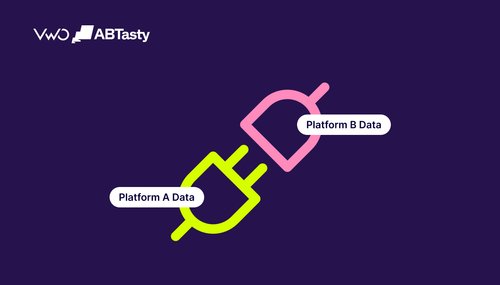
For experimentation teams, integration depth often separates a basic testing tool from a true optimization platform. Without strong connections to analytics, CRM, CDP, or marketing tools, test data stays siloed, leading to fragmented insights and disconnected workflows.
This guide breaks down the integration and testing capabilities of the top A/B testing platforms, what each integration type actually enables, and how to evaluate fit before committing to a tool.
Why integrations matter for A/B testing
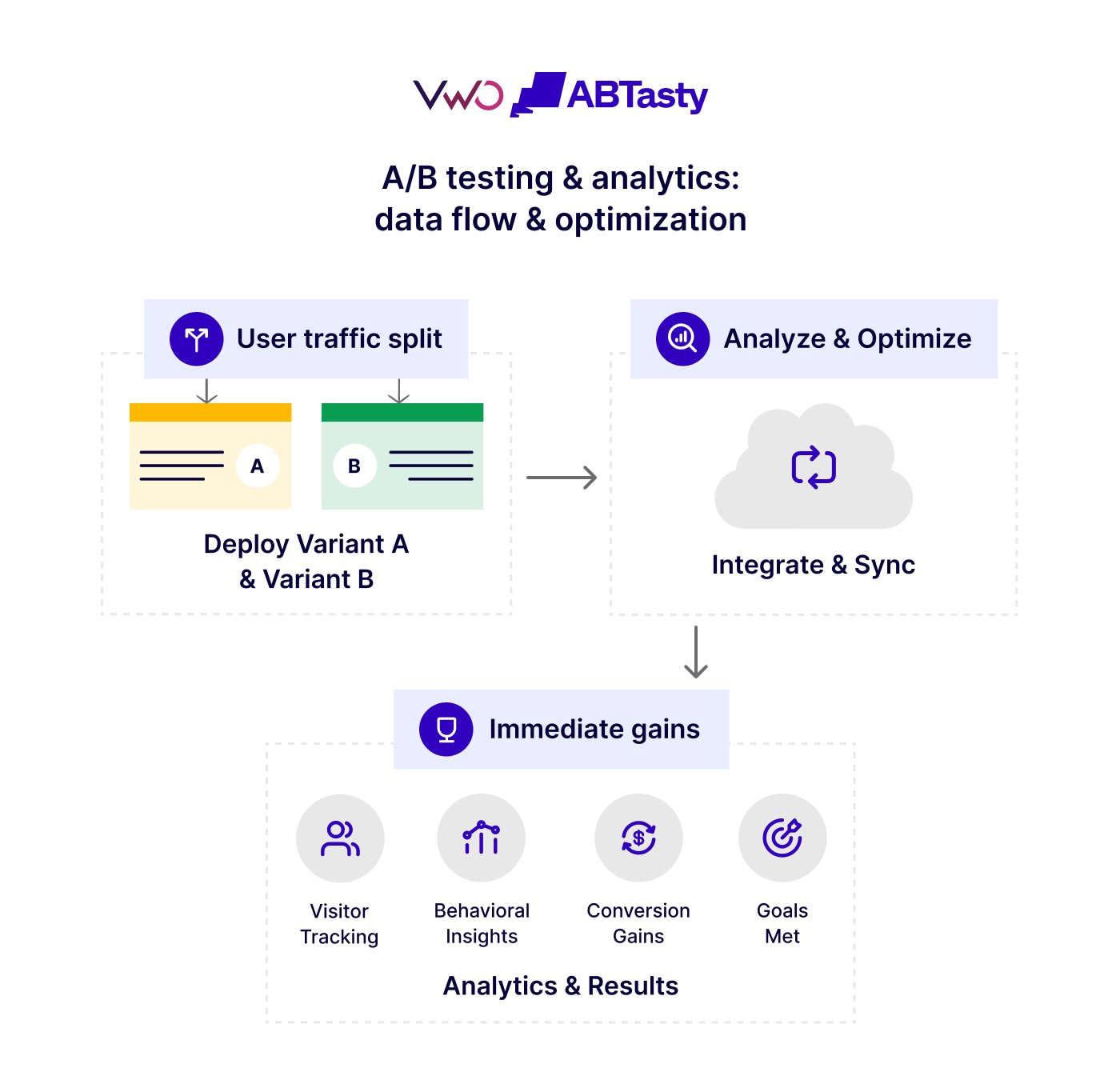
A/B testing delivers the most value when it’s connected to your broader data ecosystem. Experiments rely on inputs like behavioral signals, user attributes, and campaign data, and their outcomes need to flow into analytics tools, CRM systems, and data warehouses.
Integration depth directly impacts effectiveness. With strong integrations, test variants reach the right user groups, test results align with business metrics, and teams can focus on execution instead of managing data flows.
It also affects speed and scale. Robust integrations enable teams to target specific user segments more precisely, deliver cleaner analysis, and ensure consistent reporting across platforms, making it easier to run multiple tests across web and mobile environments.
For example, testing a new landing page layout is just the starting point. The real value lies in understanding how that change affects lead quality, revenue, or retention, and in connecting test results to business outcomes.
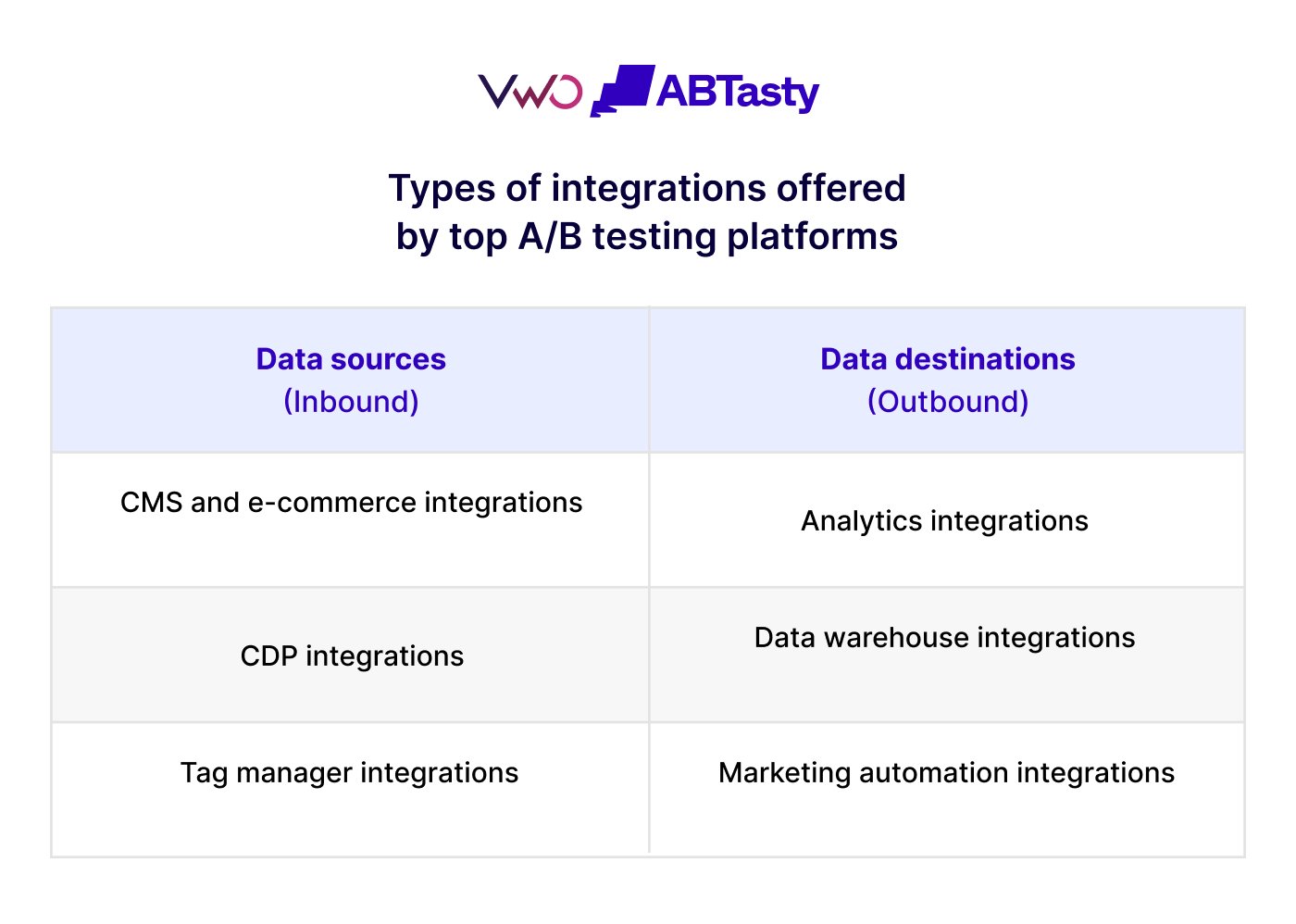
Types of integrations offered by top A/B testing platforms
1. Analytics integrations
Analytics integrations connect experiment data (campaign, variation, visitor ID) to platforms such as Google Analytics 4, Adobe Analytics, Mixpanel, Amplitude, Heap, Matamo, and more. This allows teams to analyze test results alongside real user behavior across channels, devices, cohorts, and custom events.
These integrations pass experiment variants as dimensions, support near real-time sync, and enable segment-level analysis directly within the analytics platform. This keeps test data aligned with behavioral data and helps reduce discrepancies.
VWO ABTasty offers a two-way integration with GA4 that allows teams to push experiment data (campaigns and variations) into GA4 for deeper analysis and use GA4 audiences to run targeted A/B tests. Watch the webinar to explore the benefits of this bi-directional integration.
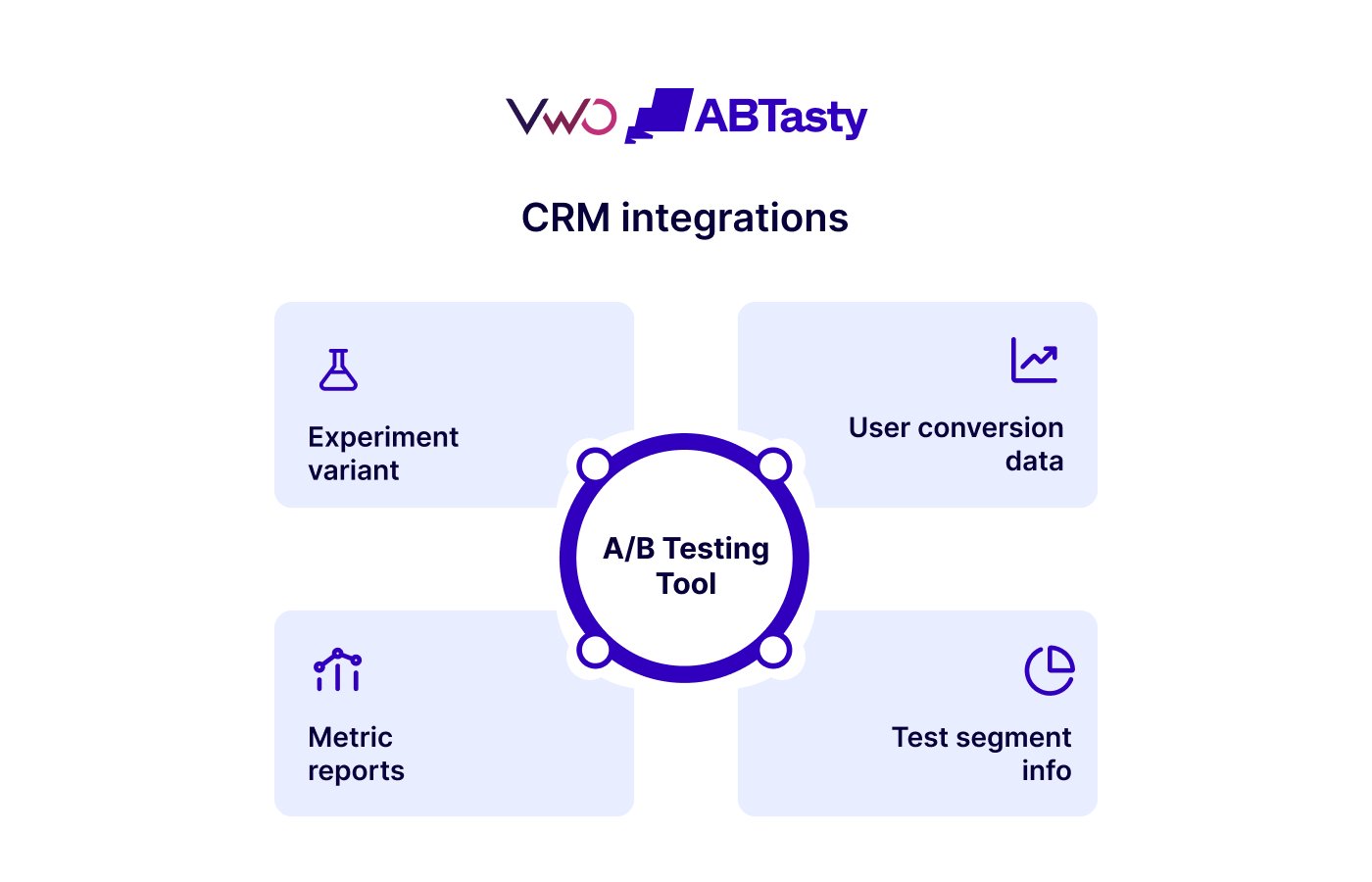
2. CRM integrations
CRM integrations connect experiment data with customer records by tying each user’s test variant to their profile, lead, contact, or account. They also use existing CRM attributes, such as engagement and purchase behavior, to create specific user segments for targeted experiments and personalization.
This links experimentation directly to outcomes. Teams can track how test variations impact lead quality, deal progression, or revenue, turning test results into measurable business KPIs.
VWO AB Tasty’s native Salesforce and HubSpot integrations support both directions. Variation data is pushed to CRM records: Leads, Contacts, Accounts, Opportunities, so you can verify whether a winning variant also produced higher-quality leads downstream. And CRM data flows back into VWO ABTasty to power rule-based targeting: show “Upgrade to Pro” to free-trial users, “Book a Demo” to MQLs, without any middleware.
3. CDP integrations
CDP integrations enable bidirectional data flow: experiment exposure events flow into the CDP to enrich user profiles, while user traits from the CDP power advanced audience segmentation in the testing platform.
This improves both targeting precision and audience consistency. Experiments can run on well-defined user segments, stay consistent across web, mobile, and other channels, and be triggered using real-time events.
The result is cleaner audience qualification and more reliable test results, especially for teams running advanced testing across multiple platforms.
This webinar highlights how CDP-driven insights can improve personalization and enable more precise testing.
4. Data warehouse integrations
Data warehouse integrations connect A/B testing tools to platforms such as BigQuery, Snowflake, and Redshift, sending experiment events (e.g., exposure, variation assignment, conversions) directly into your warehouse tables. This keeps experimental data aligned with core business metrics such as revenue and retention.
For warehouse-first teams, this enables custom statistical analysis, tracking of the long-term impact of experiments, and evaluation of downstream metrics such as lifetime value. It also improves data consistency and control, keeping test results aligned with internal reporting and data models.
5. Tag manager integrations
Google Tag Manager and similar tools allow non-technical users to deploy and modify A/B testing scripts without code deployments. Tag manager integration is essential for CRO specialists and marketing teams who need to run experiments on web platforms without waiting for engineering support.
6. Marketing automation and personalization integrations
Connecting A/B testing platforms to marketing automation tools enables experiment-driven personalization at scale. Teams can trigger different marketing automation flows based on which test variant a user experienced, or use campaign membership data to build test audiences.
For teams running multiple campaigns across multiple screens, this integration layer is what connects experimentation to the broader customer experience.
7. CMS and eCommerce platform integrations
CMS and eCommerce integrations connect A/B testing tools to platforms such as Shopify, BigCommerce, Drupal, and Salesforce Commerce Cloud, enabling teams to run experiments, including split URL testing, directly on landing pages, product pages, and checkout flows with minimal setup.
These integrations reduce developer dependency, support tracking of key user interactions, such as cart events, and enable faster iteration on test variations, helping teams optimize user experiences and conversions across web platforms.
8. LLM integrations via MCP
LLM integrations connect experimentation platforms to AI tools, enabling teams to access experiment data, reports, metrics, and testing workflows through natural-language interfaces.
Using the Model Context Protocol (MCP), compatible AI assistants can securely retrieve data from experimentation platforms, answer questions about experiments, surface insights, and assist with testing workflows using conversational prompts.
Learn how the MCP Server enables AI tools such as Claude, ChatGPT, and Gemini to access experiment data, campaign performance, metrics, and optimization insights directly from VWO, helping teams streamline analysis and decision-making.
We’ve taken on and adapted Claude into the business. Our main win around Claude is the MCPs. So at Hype, we’ve got three core service offerings: analytics, paid, and CRO. The Claude MCPs allow us to centralize all the data points — Google Ads, Meta Ads from a client, our actual VWO testing and web testing data, as well as behavioral data, either from VWO Insights or wherever it may be from. We can centralize this data, enabling easier cross-silo work between our PPC and CRO teams. We’ve all got access to this data at a centralized point, and it can help us strategize based on the cold, hard data that we mentioned at the beginning.
Emily Isted, Director of CRO, Hype Digital (Source: VWO Podcast)
Top integrations used with A/B testing platforms
1. Analytics integrations
Analytics integrations connect experiment data with real user behavior, enabling deeper analysis across channels, cohorts, and events.
They push experiment and variation data into your analytics platform for deeper analysis, and pull audience cohorts back into your testing tool for precise targeting. Most support custom event tracking, conversion reporting, and audience segmentation across devices and channels.
What each brings uniquely:
GA4: Two-way integration; run experiments on GA4 audiences and sync variation data back into GA4 custom dimensions for analysis alongside existing event tracking.
Adobe Analytics: Enterprise-grade reporting with advanced segmentation; preferred by teams already in the Adobe ecosystem for consistent cross-channel measurement.
Amplitude: Tracks complex behavioral events and funnel drop-offs; import Amplitude cohorts directly into your testing platform to run experiments on specific user segments.
Mixpanel: Event-based analytics focused on user actions and retention; useful for product teams measuring experiment impact beyond surface-level conversions.
Heap: Automatically captures all user interactions without pre-defining events; useful for retroactive analysis of how variant users behaved across the session.
Contentsquare: Connects experiment variations to zone-based engagement data; see exactly which page elements drove the behavioral difference between variants.
FullStory: Filter session recordings and behavioral replays by test variation surfaces the qualitative story behind quantitative results.
2. CRM integrations
CRM integrations connect experiment data with customer records, allowing teams to track how different variations impact leads, pipeline, revenue, and lifecycle stages. They link test variants to user profiles, enable downstream impact analysis beyond on-page metrics, support targeting based on CRM attributes, and combine behavioral data with known identities for more precise segmentation and insights.
What each brings uniquely:
Salesforce: Syncs variation data across Leads, Contacts, Accounts, and Opportunities, for pipeline-level attribution
HubSpot: Variation data appears as custom events in contact activity timelines and can be triggered in marketing automation workflows. HubSpot contact lists can be imported directly into VWO ABTasty for experiment targeting.
Zoho CRM: Connects experiment exposure to Zoho contact and deal records; useful for SMB teams running experimentation alongside Zoho’s broader sales and marketing suite.
3. CDP integrations
CDP integrations enable bidirectional data flow, experiment exposure events enrich unified customer profiles in the CDP, while customer traits and real-time behavioral events flow back into the testing platform to power advanced audience segmentation. Most support centralized identity resolution, deduplication across devices, and downstream routing to connected tools.
What each brings uniquely:
Segment: Acts as the central integration hub; VWO ABTasty experiment data routes into Segment once and flows automatically to every connected downstream tool. Supports real-time event triggering and full bidirectional audience sync with VWO.
Tealium: Enterprise-grade tag governance and audience management; AudienceStream allows randomized, persistent visitor segmentation that can sync with experimentation platforms for cross-channel consistency.
RudderStack: Warehouse-native CDP; streams warehouse-level customer data into VWO ABTasty to personalize experiments for high-value or returning segments, without a separate data pipeline.
4. Data warehouse integrations
Data warehouse integrations route raw experiment data into your primary source of truth, enabling custom statistical analysis and joining test results with business metrics: revenue, retention, and LTV are not always available directly within testing tools.
Most eliminate discrepancies between the testing dashboard and internal BI tools, and support compliance requirements by keeping sensitive data within your own infrastructure.
What each brings uniquely:
BigQuery: Google-native warehouse with strong compatibility across GA4 and GCP-based stacks; VWO supports native export to BigQuery with no ETL pipeline required.
Snowflake: Cloud-agnostic and optimized for large-scale querying; preferred by enterprise teams running multi-platform data models where experiment data needs to join with data from multiple business systems.
Redshift: AWS-native warehouse; commonly used by teams with existing AWS infrastructure who want experiment data to live alongside their core product and revenue data.
5. CMS and eCommerce integrations
CMS and eCommerce integrations enable experiment deployment directly on the platform, reducing setup time, reducing the need for custom code, and allowing marketing and content teams to run tests without developer involvement.
Most support native plugin installation, page-level targeting, and event tracking tied to platform-specific actions.
What each brings uniquely:
WordPress: Tag or plugin-based installation; enables page and post-level experiment targeting across the most widely used CMS without custom development.
Contentful: Headless CMS integration allows experimentation on content variations at the component level; useful for teams building on JAMstack or composable architectures.
Shopify: Native plugin enables cart event tracking, product pricing tests, and checkout flow experiments out of the box; no developer overhead required.
BigCommerce: Native integration supports storefront and checkout experimentation; relevant for mid-market eCommerce teams running experiments across catalogs and conversion funnels.
6. Marketing automation integrations
Marketing automation integrations connect experiment outcomes to downstream campaign logic; variation data flows into messaging platforms, triggering different automation sequences based on which variant a user experienced.
Most support audience segmentation by variant, cross-channel campaign triggering, and personalized follow-up across email, push, and in-app channels.
What each brings uniquely:
Braze: Real-time variation data flows into Braze to trigger personalized email, push, and in-app messages, ensuring users receive consistent follow-up aligned with their on-site experiment experience.
MoEngage: Connects experiment variants to MoEngage’s AI-driven engagement workflows; useful for mobile-first teams running experiments across app and web simultaneously.
Marketo: B2B-focused marketing automation; supports experiment-triggered lead nurture sequences and scoring updates; preferred by enterprise teams connecting CRO outcomes to demand generation workflows.
7. Tag management integrations
Tag manager integrations allow teams to deploy and manage testing tools without direct code changes, using visual and code editors to control load order, firing rules, and targeting logic through a centralized interface.
This reduces developer dependency for experiment setup and ongoing maintenance.
What GTM brings uniquely:
Google Tag Manager: A widely used tag manager across platforms; VWO AB Tasty, Optimizely, and Statsig all support GTM for deployment. VWO AB Tasty’s native GTM integration goes further, using real-time GTM data to enhance experiment targeting rules, not just for installation but for active campaign management.
Integration capabilities of leading A/B testing platforms
A/B Testing Tool
Integrations Offered
VWOAB Tasty
Analytics, CDP, CRM, CMS, eCommerce, Marketing automation, Tag management, and more
Optimizely
Analytics, CRM, Site optimization, DAM, CDP, and more
How to evaluate integration capabilities before choosing an A/B testing tool
Tech stack compatibility: Prioritize native connectors where available, but ensure the tool also supports flexible integrations via APIs or middleware.
Depth of integration: Look for meaningful data exchange, such as two-way data flow where needed, near real-time or event-driven sync, and support for audience targeting.
Support for advanced testing environments: Confirm integrations extend beyond web to mobile app testing, multivariate testing, and server-side testing, especially if you run experiments across platforms.
API and SDK flexibility: Strong APIs, SDKs, and webhooks are essential for custom workflows, feature flags, and deeper experimentation.
Data consistency and reporting: The platform should align test results with business metrics across your stack to ensure consistent, discrepancy-free reporting.
Pro Tip!
Use VWO ABTasty’s integrations page as a live checklist against your stack. Each integration listing specifies the data flow direction, setup method, and which product it applies to, so you can verify fit at the connector level, not just the category level.
Common integration challenges and how to avoid them
1. Data inconsistencies across tools
When experiment data flows between testing tools, analytics platforms, and CRMs, small differences in tracking (sessions, users, timing) can create mismatches.
Fix: Establish a primary reporting source and align tracking definitions across tools before running experiments.
2. Identity resolution gaps
Testing tools often track anonymous users, while CRMs rely on identifiable data such as email addresses or customer IDs. Without a consistent identifier, it’s difficult to connect test variants to real business outcomes.
Fix: Ensure a shared user ID across systems or use a CDP to unify identities across touchpoints.
3. Performance impact from multiple integrations
Adding testing scripts, analytics tags, and CDP integrations can slow down pages, especially with client-side testing, affecting both user experience and test accuracy.
Fix: Use async loading, minimize unnecessary scripts, and consider server-side testing for performance-sensitive flows. Tag managers can help manage deployment, but they should be used carefully.
4. Integration limitations and drift
Some integrations are restricted by plan tiers or break silently after platform updates. Teams often realize this only after workflows stop syncing correctly.
Fix: Validate the integration’s availability up front and schedule periodic checks to ensure everything continues to work as expected.
Best practices for building an A/B testing integration stack
1. Start with a solid data foundation
Get your core layer right first: analytics, CRM, and data warehouse. Your A/B testing tool should integrate cleanly with these systems before adding anything else.
2. Centralize data flow through a CDP or data layer
Instead of connecting each tool separately, route experimental data through a central hub (such as a CDP or warehouse). This keeps data consistent, simplifies governance, and makes it easier to scale or switch tools later.
3. Validate integrations before scaling experiments
Before launching, check that events, variants, and user data are flowing correctly across systems. A quick validation run can prevent unusable data and rework later.
4. Document and monitor your integration setup
Keep a simple record of how systems connect, where data flows, and who owns each integration. Regular checks help catch breaks early, especially after tool updates or internal changes.
Conclusion: How VWO ABTastybrings the experimentation stack together
As experimentation scales, the challenge shifts from running tests to connecting insights, execution, and data across systems.
VWO ABTasty brings this together in a unified platform that integrates seamlessly with your existing stack, reducing reliance on disconnected tools while keeping data aligned.
It enables teams to:
Run experiments across web and backend systems
Understand user behavior and identify friction through built-in insights
Target and personalize experiences using real user data
Connect experiment results with business metrics like revenue and retention
At the same time, our platform integrates with analytics platforms, CRM systems, CDPs, data warehouses, and marketing tools, ensuring experiment data flows across your ecosystem for consistent analysis and activation.
Ready to see how VWO ABTasty fits into your stack? Request a demo to explore how its integrations work in your environment.
FAQs
Which A/B testing tools provide advanced analytics integrations?
Tools like VWO, Optimizely, Kameleoon, and Convert offer strong integrations with analytics platforms such as GA4, Mixpanel, and Amplitude, enabling deeper analysis of test results alongside user behavior data.
What are the best A/B testing tools that integrate with CRM platforms?
VWO ABTasty and Kameleoon provide native CRM integrations with tools like Salesforce and HubSpot, allowing teams to connect experiment variants with leads, contacts, and revenue outcomes.
Which A/B testing tool offers the most integrations?
Platforms like VWO ABTasty and Adobe Experience Cloud offer the broadest integration ecosystems, covering analytics, CRM, CDP, data warehouses, and marketing automation tools.
Do integrations slow down website performance?
Not usually. Most modern tools use async loading and optimized scripts to minimize impact. Slowdowns typically come from stacking too many integrations, which can be controlled with tag managers or server-side implementations.
Are integrations available in free A/B testing tools?
Yes, but they are typically limited. Free plans often support basic integrations, while advanced capabilities like bidirectional sync and real-time data flow are available in paid tiers.
Hi, I’m Pratyusha Guha, manager - content marketing at VWO. For the past 6 years, I’ve written B2B content for various brands, but my journey into the world of experimentation began with writing about eCommerce optimization. Since then, I’ve dived deep into A/B testing and conversion rate optimization, translating complex concepts into content that’s clear, actionable, and human. At VWO, I now write extensively about building a culture of experimentation, using data to drive UX decisions, and optimizing digital experiences across industries like SaaS, travel, and e-learning.
Uncover hidden visitor insights to improve their website journey
One of our representatives will get in touch with you shortly.
Awesome! Your meeting is confirmed for at
Thank you, for sharing your details.
-
, you're all set to experience the VWO demo.
I can't wait to meet you on at
Account Executive
, thank you for sharing the details. Your dedicated VWO representative, will be in touch shortly to set up a time for this demo.
We're satisfied and glad we picked VWO. We're getting the ROI from our experiments.
Christoffer Kjellberg
CRO Manager
VWO has been so helpful in our optimization efforts. Testing opportunities are endless and it has allowed us to easily identify, set up, and run multiple tests at a time.
Elizabeth Levitan
Digital Optimization Specialist
As the project manager for our experimentation process, I love how the functionality of VWO allows us to get up and going quickly but also gives us the flexibility to be more complex with our testing.
Tara Rowe
Marketing Technology Manager
You don't need a website development background to make VWO work for you. The VWO support team is amazing
Elizabeth Romanski
Consumer Marketing & Analytics Manager
Trusted by thousands of leading brands
Awesome! Your meeting is confirmed for at
Thank you, for sharing your details.
Your Roadmap to Better Results
1:1 Demo customized to your industry and optimization goals.
Feature deep-dive into the user behaviour tools you need most.
No-pressure advice on the best path forward for your team.




 ChatGPT
 Perplexity
 Gemini
 Claude
 Grok
Grok