Other key indicators include confusing navigation, inconsistent design elements, broken links, and unclear calls to action, all of which hinder a user’s ability to find information or complete tasks.
8 most common website design issues and solutions on how to solve them
Here are 8 of the most common web design challenges and issues:
1. Lack of responsive web design
If your site doesn’t adapt to different screen sizes, then buttons become too small on mobile phones, content gets cut off, or the navigation menu breaks.
For instance, menus that fail to collapse or clickable areas that fail to respond create doubts over a website’s authenticity and lead to an unpleasant user experience.
Solution
Use flexible grids, scalable images (SVGs where possible), and test on a variety of devices.
2. Balancing aesthetics with usability
Often, a site looks and feels great but lacks functionality due to heavy visuals that either slow things down or impact the content-viewing experience.
It is crucial to have a design that does not distract visitors from the primary goal on a page.
Find and remove design elements that create friction or prevent visitors from completing a task.
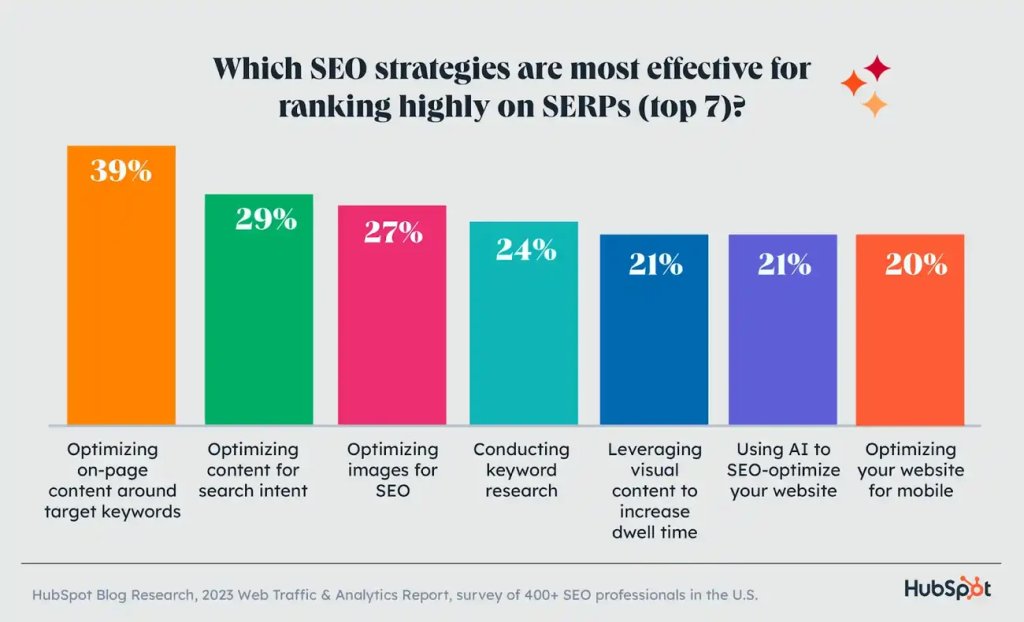
3. Ignore SEO best practices in design
Another frequent website design challenge is the lack of SEO integration into the website’s architecture.
Some design decisions, such as website content hidden behind tabs, images without alt text, and improper heading hierarchy, can harm search engine rankings and user discovery.
Solution
Integrate all possible SEO elements from the start, including:
Semantic HTML (H1, H2…)
Alt text on images
Fast loading speed
Mobile-friendly design
All the above elements should be linked to your SEO strategy.
Many websites still don’t comply with web accessibility guidelines and fail to cater to users with impairments.
Low-contrast text, missing alt tags, and non-keyboard navigation menus all impact the accessibility of a website.
Solution
Follow Web Content Accessibility Guidelines (WCAG) standards to include minimum contrast ratios, provide alternative text for images, and support screen readers.
5. Slow page loading speed
Even the most aesthetically pleasing websites can lose visitors if the load time is high.
An eCommerce site that loads in 5 seconds sees 2.5x lower conversions than a website that loads in just one second.
Fancy graphics may keep visitors hooked, but heavy images often increase loading speed time and distract from primary tasks.
Solution
Use compressed and optimised images, using caching, minimising redirects and third-party scripts, and using lazy-loading where appropriate. Monitor actual load times and correlate with conversion metrics.
6. Navigation problems
Novel or overly creative navigation may confuse users.
When designing your website, avoid using unclear labels or hidden menus, as this can reduce usability.
Solution
Keep navigation simple, predictable, consistent. Use common patterns (a hamburger menu on mobile devices, a visible top menu on desktop) and label categories clearly.
Test alternative navigation flows and keep the one that keeps users moving.
Every element on a page should work towards nudging the visitor towards a common goal or action. This includes signing up for a demo, making a purchase, or clicking on a CTA.
Solution
Ensure your CTAs are prominent, the flow is intuitive, and the value proposition is clear.
8. Browser compatibility and legacy support
Most websites work well in Chrome, but break in older browsers or less common environments, which can affect a large section of your users.
Ensure your website performs well, regardless of the browser or device used.
Solution
Test across multiple browsers, including older versions, to ensure compatibility. Use polyfills or fallback styles for features that are not supported by the browser.
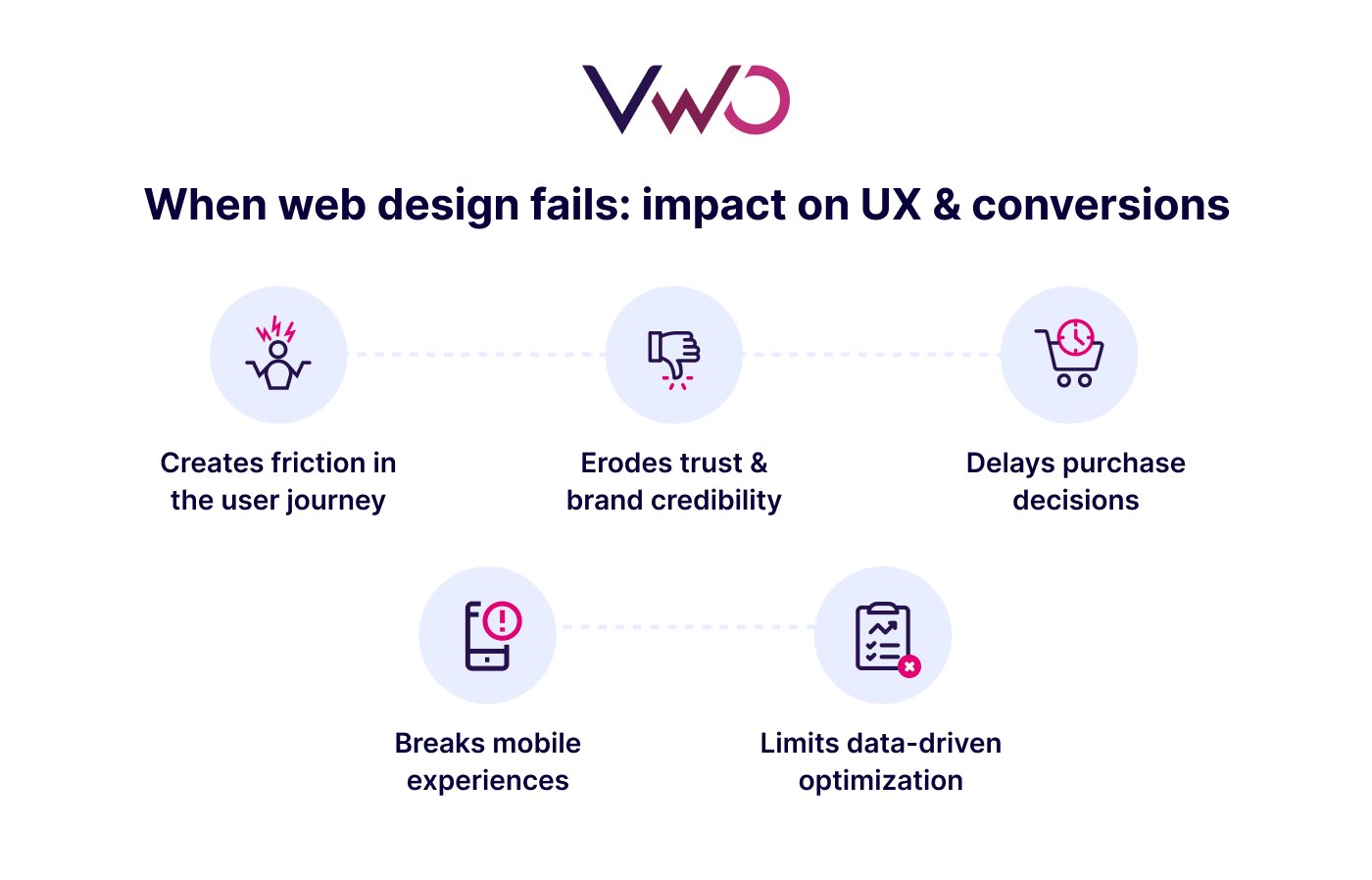
How does poor website design affect user experience and conversions?
Your website is often your first (and sometimes only) impression the visitor has of your brand. In just 0.05 seconds, visitors form an opinion about your website.
Outdated visuals, poor readability, or inconsistent branding signal neglect, which is a risk for any visitor scrolling through your website.
They might hesitate to sign up, share personal info, or make purchases on a site that feels unreliable.
Pro Tip!
Compare and analyze the behavior of highly engaged users vs. those who leave prematurely with VWO Insights. This will help you spot hidden patterns or behavioral trends that drive engagement on key pages, enabling you to make confident, targeted improvements.
3. Slows down decision-making
As per a study, desktop sites have an average page load time of 2.5 seconds. If your website is slow or cluttered, it will not only frustrate users but also cost you real money.
Even slight design improvements, such as optimized images, a better visual hierarchy, or a cleaner layout, can help reduce website load times.
4. Breaks mobile experiences
85% of mobile users want a company’s website to be as good or better than their desktop site.
Mobile responsiveness isn’t just a design best practice; it’s a conversion mandate.
Poorly designed websites still require users to pinch-zoom or scroll endlessly. When users can’t easily navigate or fill a form on their mobile devices, they simply bounce.
5. Prevents data-driven optimization
Poor design affects usability and also limits what you can learn.
When site structure is inconsistent or visually overloaded, user research tools like heatmaps, session recordings, and surveys can surface noisy or misleading signals instead of clear patterns.
As a result, teams struggle to accurately isolate friction points, making it harder to determine what’s working, what’s failing, and where to optimize next.
If you want to understand user behavior, start by building a strong foundation. Read the classics, like ‘Don’t Make Me Think’, an old book that offers timeless insights into how people think and interact with interfaces. The key is to focus on fundamentals first. Build your base before jumping into advanced techniques. Learn how users think, learn the patterns, and only then move on to the more complex stuff.
How UNext used VWO to identify friction and increase form submissions by 9.34%
UNext noticed that their online degree program pages were not driving enough lead actions.
They used VWO’s heatmaps and session recordings capabilities to analyze the page and understand more about this issue. Their analysis revealed valuable insights about the page:
Lack of visual appeal
Confusing form layout
Missing benefits and urgency cues
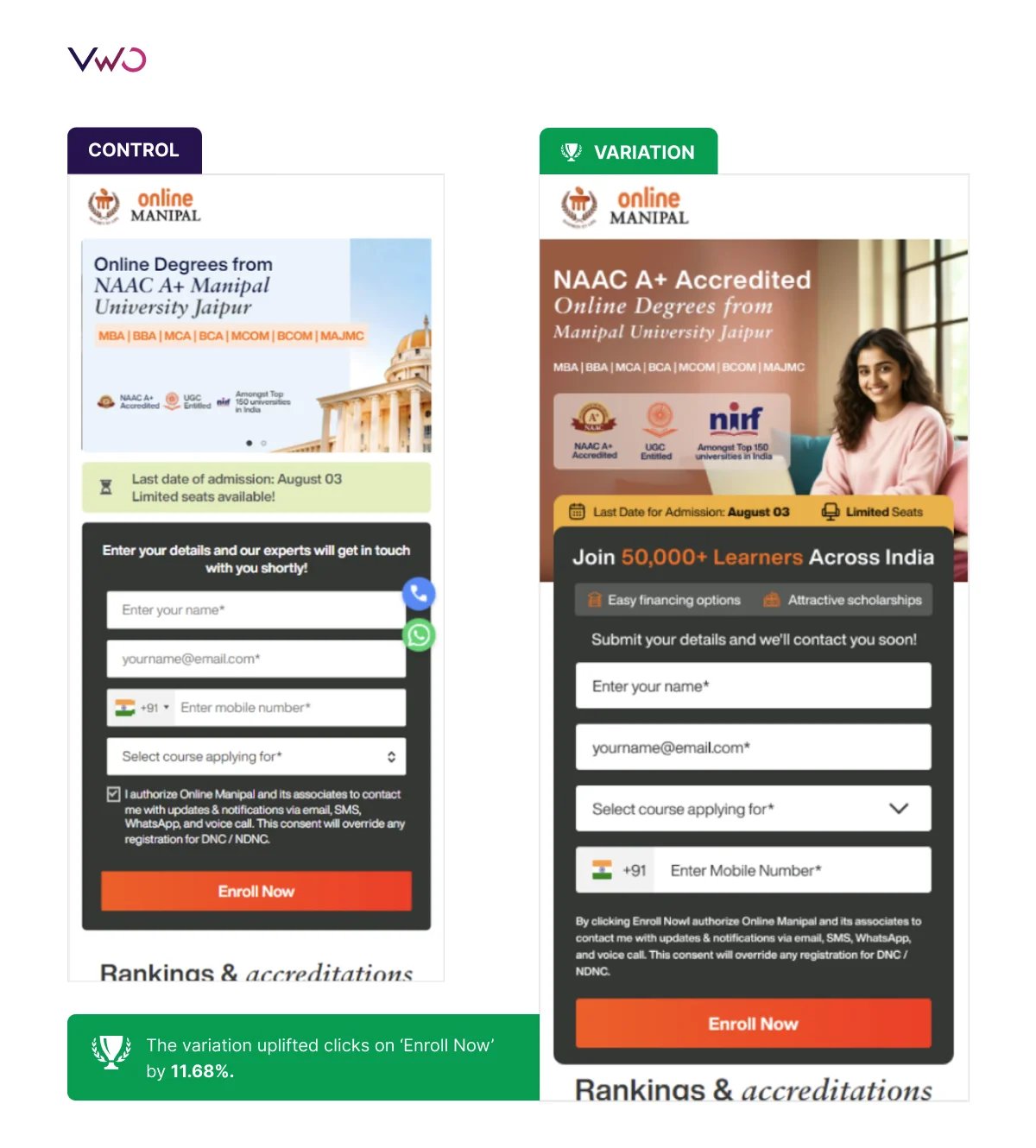
Based on these insights, UNext redesigned the mobile page. They simplified the form flow, highlighted key scholarships and financial aid, and also added a clear application deadline for urgency.
The redesigned page led to a 11.68% uplift in clicks on the ‘Enroll Now’ CTA, and a 9.34% uplift in form submissions.
It’s a strong example of how small, insight-led design changes backed by A/B testing can meaningfully boost conversions without a full redesign.
The way forward
High bounce rates. Low form fills. Visitors dropping off at the exact moment you want them to stay.
These aren’t design problems you solve by guesswork. These are friction points you need to remove by seeing your website through your users’ eyes.
With VWO Insights, you can watch real user behavior to pinpoint exactly where friction occurs.
Once you know what’s breaking the user experience and why, optimization becomes straightforward.
When you continuously analyze user behavior and refine user experiences based on those insights, your website becomes a growth engine rather than a guesswork exercise.
Schedule a demo to explore how you can spot and fix web design issues with VWO Insights.
Frequently asked questions (FAQs)
Q1. What are the dos and don’ts of designing an effective website?
Here is a list of dos and don’ts of designing an effective website: Do’s: – Ensure users easily find what they need. – Optimize images, code, and hosting to minimize load times. – Use a predictable visual hierarchy, spacing, and navigation. – Guide users toward the next action. – Test changes and analyze user behavior before making design decisions. Don’ts: – Add elements that compete for attention or overwhelm users. – Bury important content lower down the page. – Use heavy images or visuals that slow down the site. – Hinder accessibility with missing alt text or low contrast. – Make design decisions based on “gut feelings” instead of actual user data.
Q2. What is a web design issue?
A web design issue is any design or structural element that negatively affects how users experience or interact with a website. This includes: – Poor navigation or confusing layouts – Slow loading times – Lack of responsive design on mobile devices – Low contrast or hard-to-read text – Visual elements that impact usability These issues create friction, reduce trust, and directly impact engagement, conversions, and overall business outcomes.
Hi, there! I’m an Associate Manager of Content at VWO with 6 years of experience in B2B and B2C marketing. I work across blogs, SEO, thought leadership, newsletters, landing pages, and a video podcast I built and manage from scratch. At VWO, I’ve gained expertise in CRO, experimentation, user behavior research, and personalization, creating content that makes complex ideas clear and actionable. Outside of work, I enjoy experimenting with memes and short-form video on Instagram.
Uncover hidden visitor insights to improve their website journey
One of our representatives will get in touch with you shortly.
Awesome! Your meeting is confirmed for at
Thank you, for sharing your details.
, you're all set to experience the VWO demo.
I can't wait to meet you on at
Account Executive
, thank you for sharing the details. Your dedicated VWO representative, will be in touch shortly to set up a time for this demo.
We're satisfied and glad we picked VWO. We're getting the ROI from our experiments.
Christoffer Kjellberg
CRO Manager
VWO has been so helpful in our optimization efforts. Testing opportunities are endless and it has allowed us to easily identify, set up, and run multiple tests at a time.
Elizabeth Levitan
Digital Optimization Specialist
As the project manager for our experimentation process, I love how the functionality of VWO allows us to get up and going quickly but also gives us the flexibility to be more complex with our testing.
Tara Rowe
Marketing Technology Manager
You don't need a website development background to make VWO work for you. The VWO support team is amazing
Elizabeth Romanski
Consumer Marketing & Analytics Manager

 DE
DE
 BR
BR




 ChatGPT
 Perplexity
 Gemini
 Claude
 Grok
Grok








![[Gifographic] Better Website Testing – A Simple Guide to Knowing What to Test](https://static.wingify.com/gcp/uploads/sites/3/2021/01/Feature-image_Gifographic-Better-Website-Testing-–-A-Simple-Guide-to-Knowing-What-to-Test.png?tr=h-600)

![[Infographic] Why a Website Redesign Doesn’t Always Work](https://static.wingify.com/gcp/uploads/sites/3/2016/06/Feature-image_Infographic-Why-a-Website-Redesign-Doesnt-Always-Work.png?tr=h-600)