DE
DE
 BR
BR





 ChatGPT
 Perplexity
 Gemini
 Claude
 Grok
Grok
A Product Team Guide to Safe Feature Releases Using Progressive Rollouts

The $10 billion mistake.
July 19, 2024. CrowdStrike pushed a faulty security update to 8.5 million Windows systems simultaneously, causing airports to shut down, banks to freeze, and hospitals to go offline. The global cost exceeded $10 billion, with Delta Airlines alone losing $500 million. The culprit wasn’t just a bad update but the decision to skip progressive rollout.
So, what’s a progressive rollout anyway?
A progressive rollout is a deployment strategy where features are released gradually to increasing percentages of users. The typical rollout curve works like this:
1-5% (your canary group) → 10-50% (risk and extended validation) → 100% (full deployment)
At each phase, you monitor critical metrics, gather feedback, and make the go/no-go decision based on data.
In this blog, we’ll walk through exactly how product teams can reduce release risk with progressive rollouts. You’ll learn what to monitor at each phase, when to proceed or roll back, and the best practices that prevent disasters like CrowdStrike’s.
Whether you’re shipping a minor UI tweak or a complete infrastructure overhaul, this framework helps you deploy safely without slowing down.

Breaking down the progressive rollout process
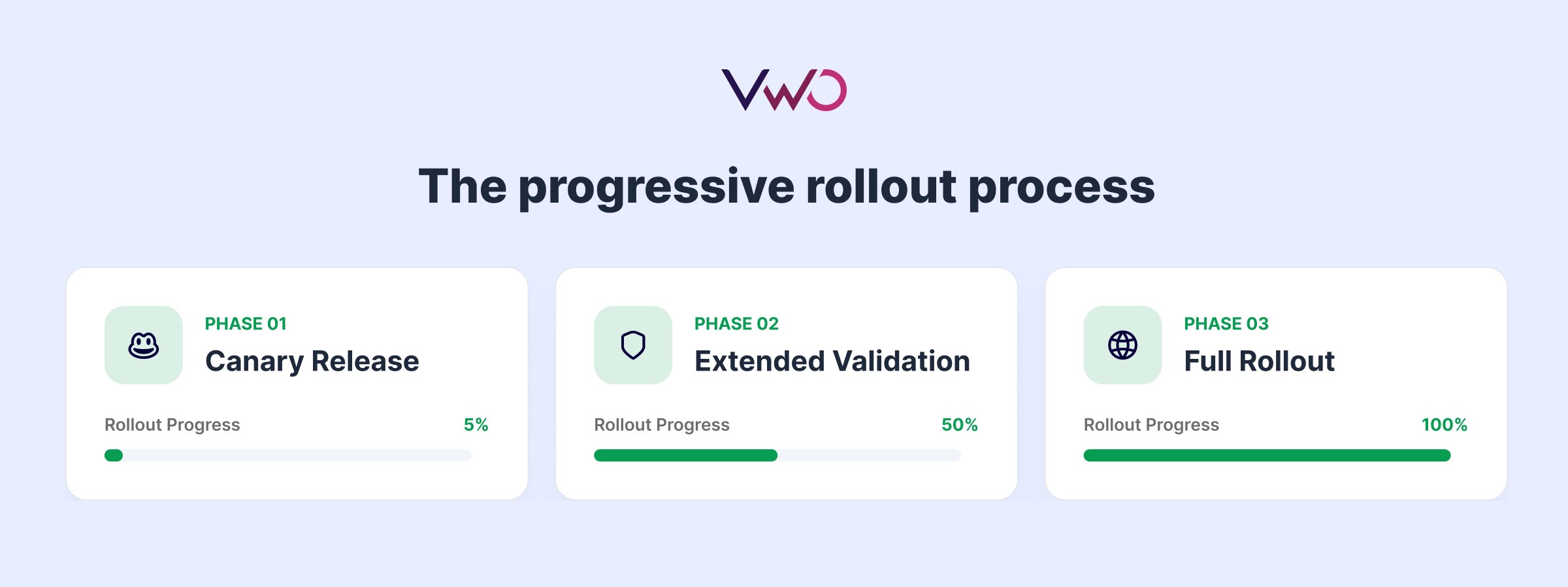
Phase 1: Canary release (1-5%)
The canary phase is your first line of defense against production disasters. Deploy your feature to 1-5% of users and watch closely for the next 24-48 hours.
a. Pick the right canary group
Your canary users should mirror your actual user base. For example, if you only test on users with high-speed fiber connections, you’ll miss loading issues that frustrate users on slower mobile networks. Include a mix of device types, browsers, operating systems, connection speeds, and user behaviors to catch issues early.
b. Monitor KPIs and guardrail metrics
Track error rates, API response times, and crash reports in real-time. Watch how users adopt the feature. Pay attention to browser and device-specific problems that might not show up in testing. Beyond your core KPIs, set up guardrail metrics to catch unexpected side effects like increased page load times or memory usage spikes.
c. Define your stop conditions upfront
Before you hit deploy, write down your rollback rules. For example, if you see zero critical errors and performance stays within 10% of baseline, move forward. If error rates cross 0.1%, crashes get reported, or API response times drop by more than 20%, stop immediately and roll back.
Use of feature flags becomes critical in stopping rollout. Instead of scrambling to redeploy code, you simply flip a switch in your feature management platform. The problematic feature disappears across all users instantly, no code changes or deployments needed.
Phase 2: Risk & extended validation (10-50%)
Phase 2 is where you stress-test the rollout. Your feature survived the canary phase; now it faces diverse users, heavier loads, and real-world complexity across multiple segments.
a. Expand to critical user segments
At 10%, include power users and enterprise customers who push features harder than average users. They run complex workflows and surface edge cases that are missed. At 25-50%, validate across segments like enterprise versus SMB, mobile versus desktop, and different geographies.
A feature working on the desktop might break mobile checkout. Watch for unexpected user behaviors that deviate from how you expected the feature to be used.
b. Monitor infrastructure under realistic load
Track database query performance, CDN cache hit rates, and server costs as load increases. If queries slow from 50ms to 300ms at 25%, you’ll hit serious problems at 100%. Check that the infrastructure scales linearly without concerning patterns. Watch conversion rates, engagement metrics, revenue impact, and customer satisfaction scores to catch issues that technical metrics miss.
c. Validate connected systems and cross-feature interactions
Check that billing calculates correctly, analytics pipelines capture data, and third-party integrations still work. Verify your feature doesn’t interfere with other experiments, personalization rules, or active feature flags. New features can break existing ones in ways that only surface when they interact.
d. Get team consensus before proceeding
Run a retrospective at 25-50%. Review support tickets, metric trends, documentation completeness, and team confidence. Ensure support can handle feature-related questions. Draft rollback communications in case issues emerge. Move forward only when product, engineering, and support agree that metrics are stable and infrastructure scales properly.
Phase 3: Full rollout (100%)
You’ve validated your feature at scale. Now complete the deployment and set up long-term monitoring.
a. Deploy to remaining users
Push the feature to 100% of users. Monitor closely for the first 48-72 hours to catch cumulative system effects that only appear at full scale. Track overall adoption rates, compare metrics against your baseline, and watch for long-term stability issues.
b. Set up post-deployment monitoring
Performance shouldn’t degrade after full deployment. Monitor availability, reliability, and response times continuously. Track business metrics like conversions, engagement, and user registrations to ensure the feature delivers expected value. Set alerts for any deviations from baseline performance.
c. Conduct a post-mortem
Gather your team within a week of reaching 100%. What worked? What didn’t? Review the timeline, decisions made at each phase, and how accurately you predicted issues. Document what metrics proved most valuable and which ones were noise.
d. Archive learnings and clean up
Document the entire rollout process, key decisions, and metrics in your central repository. This becomes your reference for future releases. Plan to remove temporary feature flags once the feature proves stable. Flags left in code indefinitely create technical debt and risk accidental deactivation. Mark a cleanup date and stick to it.
Five best practices that prevent rollout disasters
Now, let’s cover the practices that catch production issues early and keep rollouts on track. Teams that follow these consistently ship faster without breaking things.
a. Always have a kill switch ready
Feature flags act as instant kill switches when rollouts go wrong. Set up boolean flags that toggle features on or off without touching production code. For example, when error rates cross 0.5%, API response times degrade by 25%, or crash reports spike unexpectedly, flip the switch, and the problem disappears across all users in seconds. You fix the issue without the pressure of production burning.
b. Automate as much of the rollout as possible
Automate percentage increases based on predefined health checks rather than manual approvals at each phase. Set up automated monitoring that validates error rates, performance metrics, and system health before advancing from 5% to 10% or 25% to 50%.
Configure automatic rollbacks when metrics breach thresholds (For example, if error rates hit 0.5% or API response times degrade by 20%), the system should roll back without waiting for someone to notice. Automation removes the “should we proceed?” debate and responds to problems faster than any human can.
c. Monitor continuously, especially off-hours
Set up automated alerts with 24/7 coverage. Issues don’t wait for business hours. Configure alerts that wake people up when thresholds break, and ensure someone’s always on call during rollouts. The gap between problem detection and response determines whether you have a minor incident or a major outage.
d. Don’t rush phases to meet deadlines
Never rush phases because someone wants the feature to be live faster. A canary phase showing warning signs needs investigation, not acceleration. Teams that skip validation steps to meet deadlines are the ones scrambling to explain outages later. Slow rollouts catch problems, while fast rollouts amplify them.
e. Document everything as you go
Keep rollout status, metrics, and decisions where your entire team can access them. Platforms like Confluence work well for this. Create a rollout page tracking what’s deployed, which metrics you’re monitoring, and what decisions you’ve made. So, the on-call engineer can pull up the page and see exactly what’s deployed, what’s breaking, and what the rollback criteria are without digging through Slack threads or guessing what happened three hours ago.
How VWO Feature Experimentation enables safe progressive rollouts
Progressive rollouts require a platform that lets you control deployments with precision and respond to issues instantly. VWO Feature Experimentation gives product teams the tools to deploy features gradually, monitor performance, and roll back instantly when issues surface.
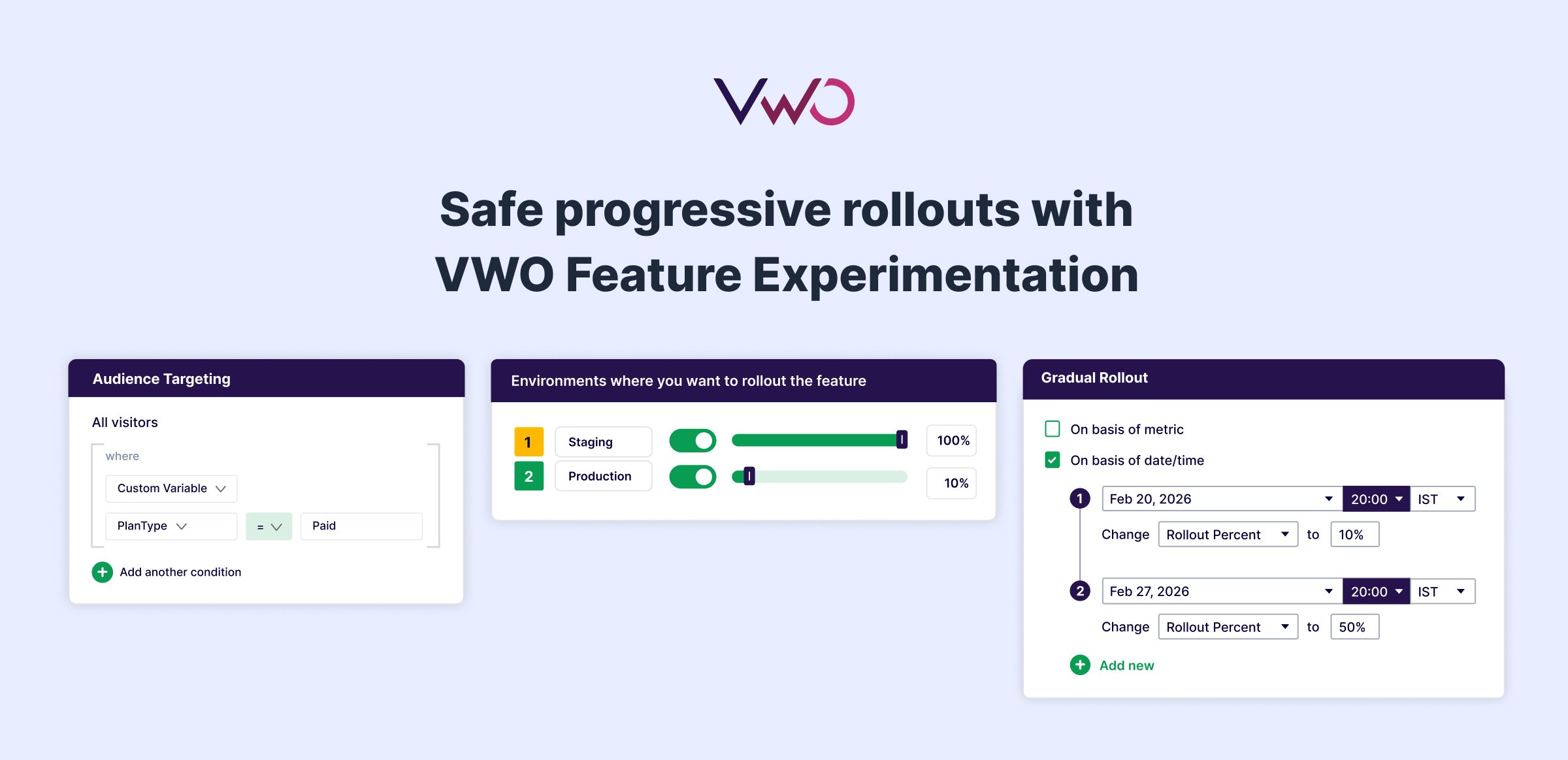
Control rollouts with precision
VWO lets you roll out features to exact percentages of users. Start at 1%, expand to 10%, scale to 50%, all without touching code. Adjust percentages in real-time based on what your metrics tell you. If error rates spike at 25%, dial back to 10% or 0% (kill switch) instantly and investigate without redeploy pressure.
Target the right users at each phase
Choose your canary users strategically. VWO’s rule-based targeting allows you to roll out to internal teams first, then to power users, and finally to specific segments, such as mobile users or enterprise customers. Test across geographies, device types, or subscription tiers to validate performance before expanding further.
Monitor across environments
Set up different rollout rules for staging, QA, and production environments. Configure open access for lower environments, allowing teams to move faster without permission bottlenecks, while critical production changes require approval workflows where designated reviewers validate configurations before they go live.
Connect with your existing tools
VWO integrates with your analytics and data platforms through callback functions that send feature flag data directly to tools like GA4, Mixpanel, and Segment. Export raw experiment data to AWS S3, Google Cloud Storage, or data warehouses like Snowflake and BigQuery for deeper analysis.
Manage flags directly from AI-powered IDEs
VWO’s MCP Server integrates with AI-powered IDEs like Cursor, VS Code, and Claude Desktop, letting you manage feature flags through natural language prompts without leaving your editor. Create, toggle, and update flags while the MCP server automatically generates SDK code and detects stale feature flags in your codebase.
Build with your tech stack
VWO supports 12+ programming languages and frameworks: Java, Python, Node.js, React, iOS, Android, and more. Integrate feature flags into your existing codebase regardless of your stack. Server-side SDKs give you complete control over feature delivery without client-side performance hits. All flag evaluations happen locally within the SDK after initial configuration, delivering sub-millisecond response times without additional network calls.
Don’t repeat CrowdStrike’s $10 billion mistake
One canary phase could have caught their bug before it crashed 8.5 million systems. Progressive rollout isn’t optional; it’s the difference between a controlled release and a global disaster.
VWO helps you ship features faster without the catastrophic risk. See how VWO’s connected ecosystem supports your entire optimization workflow. Request a demo today.
Categories: